
When the power goes out and cell towers overload, most people lose their primary way to communicate. CB radio is one of the few tools that keeps working because it doesn’t depend on towers, Wi-Fi, or a functioning grid. It runs on vehicle power or a battery pack, and as long as you have a radio and a properly connected antenna, you can transmit and receive.
That reliability is why preppers, truckers, and RV owners keep CB radios in their emergency kits. But having a radio isn’t enough. You need to know which channels to use, what to say, and how to configure your setup before the emergency happens. This guide covers the protocols, the gear decisions, and the practical steps to make CB radio a dependable part of your preparedness plan.
Why CB Radio Still Matters When Everything Else Fails
Cell networks are more fragile than most people realize. Towers rely on backup generators and batteries, and once those run out, service drops. Even before that, a surge of calls and data traffic can overload the network, making it impossible to get through. Wi-Fi is no better — home routers need electricity, and portable hotspots depend on the same strained towers.
CB radio operates on a completely different principle. It uses direct radio-to-radio communication on the 27 MHz band, with no infrastructure between you and the person you’re trying to reach. In a blackout, a CB becomes a lifeline for families, neighbors, and convoys on the road. Unlike basic walkie-talkies, which are limited to very short distances, a CB with a proper antenna can cover several miles depending on terrain and setup.
The practical takeaway: CB is not a replacement for a cell phone in every situation. But when the grid is down and the towers are silent, it is one of the few communication tools guaranteed to still work.
The Two Channels That Matter in an Emergency
CB radio has 40 channels, but two carry almost all the weight when something goes wrong.
Channel 9: The Official Emergency Channel
Channel 9 is the FCC-designated emergency channel, reserved for emergency communications and traveler assistance. It was historically monitored by state police, highway patrol, and REACT (Radio Emergency Associated Communications Teams) volunteer monitors. While active monitoring has decreased in many areas, some law enforcement agencies and emergency organizations still listen on Channel 9, especially along major interstates.
Use Channel 9 when you are involved in or directly witnessing a life-threatening emergency and cannot reach 911 by cell phone. For any extended conversation — coordinating with a REACT monitor, giving detailed location information, describing injuries — move the detailed exchange to Channel 9 so you don’t tie up the busier Channel 19.
One important limitation to understand: Channel 9 does not connect directly to 911. Any communication on Channel 9 relies on someone within range listening and being able to help or relay the message.
Channel 19: The Real-Time Highway Channel
Channel 19 is the primary trucker channel on highways across the United States. The vast majority of truck drivers keep their CB tuned to Channel 19 while driving, which makes it the most effective channel for warning other drivers about accidents, road hazards, and dangerous conditions ahead.
For emergency reporting, the practical sequence is to alert Channel 19 first. A multi-vehicle pileup ahead means traffic is stopping, and Channel 19 reaches the most drivers in real time to prevent secondary collisions. Once the immediate warning is out, move detailed emergency coordination to Channel 9.
The Protocols: What to Say and How to Say It
Knowing the channels is half the job. The other half is communicating in a way that cuts through normal chatter and gets a response.
The “Break Break Break” Protocol
The triple break is the CB equivalent of a fire alarm. It tells everyone on the channel that this is a life-threatening emergency, not a casual request to join a conversation. Reserve it exclusively for situations involving immediate danger to life.-4
Step by step:
- Key the mic on Channel 19 (or Channel 9) and clearly say: “Break break break, channel one-nine” (or “channel niner” for Channel 9).-4
- Pause 2–3 seconds to let other drivers release their mic keys and stop talking. The channel should go quiet.-4
- State the emergency clearly: “Emergency. [Highway] [direction] at mile marker [number]. [What happened]. [Help needed]. ”-4
- Wait for acknowledgment. Another driver should respond with “10-4” or “Copy that, calling 911.” If no one responds, repeat the entire message.-4
A real example: “Emergency. I-75 northbound at mile marker 142. Big truck rolled over blocking both lanes. Injuries. Need bears and ambulance.”-4
Do not use triple break for non-emergencies. False breaks erode trust in the system and can cause drivers to ignore real emergencies. A single “break” is a polite request to enter a conversation. A double “break break” is an urgent but non-life-threatening alert, such as a major road hazard.-4
The CLIP Distress Data Format
When transmitting an emergency, request a “REACT BASE” and provide the CB distress data known as CLIP:-1
- C — Call Sign: Identify yourself.
- L — Location: Be exact. Highway, direction of travel, nearest mile marker, or last exit passed.-1-3
- I — Injuries: Number, type, and whether anyone is trapped.
- P — Problem: Give details and the help needed.
Transmit CLIP repeatedly so any monitor can assist. If no response comes on Channel 9, try Channel 19 or Channel 14.
Cell Phone First, CB Second — But Use Both
In a serious emergency with injuries, always call 911 first if you have cell service. Your phone provides a direct connection to dispatchers who can send ambulances, fire trucks, and police. CB radio is your backup communication tool and your best way to warn approaching drivers. Use both: 911 for emergency response, CB for driver-to-driver safety alerts.-3
Setting Up Your CB for Emergency Readiness
A radio that isn’t configured and tested before an emergency is just a paperweight. These are the setup decisions that separate a working emergency radio from a frustrating one.
Power: Plan for the Grid to Fail
The most common failure point in an emergency is power. A mobile CB wired to the vehicle battery is the most robust option because it draws from a source that is independent of the home electrical grid. For a base or home setup, keep spare batteries and a small backup power supply on hand. If you run a mobile unit, make sure your power wiring uses an inline fuse and a dedicated circuit — don’t rely on a cigarette lighter plug that can vibrate loose under stress.-12
Antenna: The Part That Determines Whether You’re Heard
Antenna setup matters more than almost any other variable. A CB with a poor antenna is a CB with no range. For emergency preparedness, a magnetic-mount antenna on a vehicle roof is the minimum viable setup — it provides the most capability for the money and can be deployed quickly without permanent installation. Check the coax and connectors before storm season, and know how to re-seat the antenna if it gets knocked loose.
Channel Discipline: Know Your Primary and Alternative
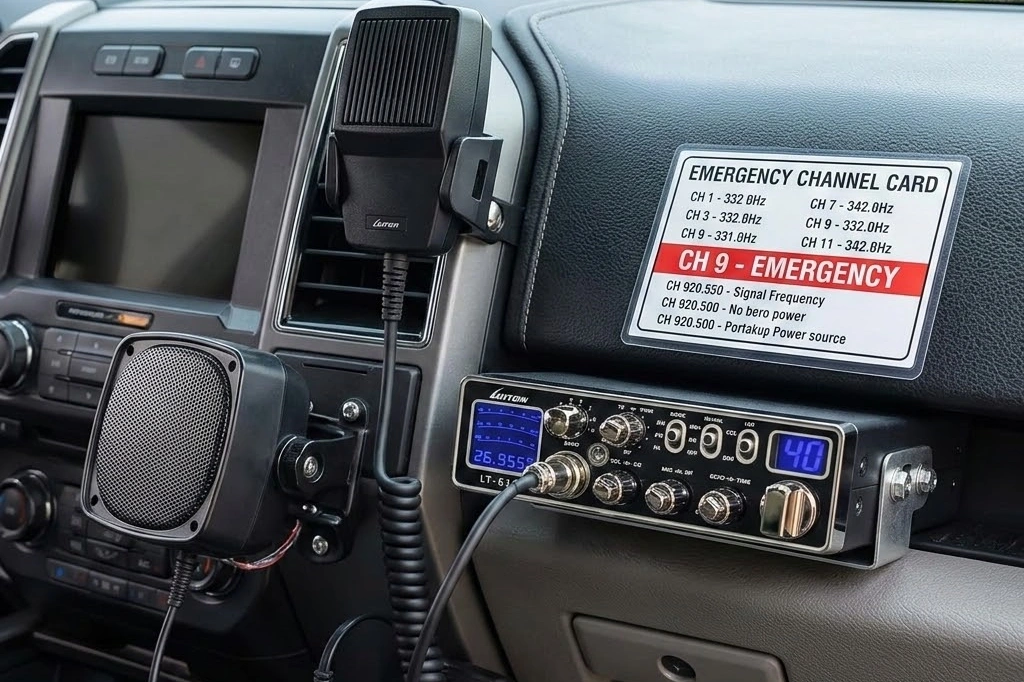
Pre-program your radio with Channel 9 and Channel 19 as priority channels, and know a fallback plan. Some preparedness planners recommend establishing a primary and alternative channel for your group, and a set of Signals Operation Instructions (SOI) so everyone knows how to switch quietly if the primary channel becomes unusable. Even a handwritten card taped to the dash with the channel numbers and the CLIP format can make a difference under stress.
A Radio Built for the Job: The LUITON LT-616
For a vehicle-based emergency setup, the radio itself needs to be compact enough to mount permanently, powerful enough to reach out when it matters, and protected against the mistakes that happen under pressure.
The LUITON LT-616 fits that brief well. It delivers 80W peak power on the 10-meter band in a slim chassis designed to fit under a dash, in a cubby, or in an overhead compartment — spaces where a full-size radio won’t go. For emergency communication, that power advantage translates into more range and a stronger signal when conditions are poor.
Two protection features matter specifically in an emergency context. SWR protection monitors the antenna system in real time and protects the radio from high SWR damage — important if your antenna takes a hit or a connector works loose. TOT (Time-Out Timer) protection automatically limits transmit time, preventing damage from accidental long transmissions and protecting the final stage from overheating. Under stress, it’s easy to key the mic and forget to release it; TOT is a quiet safeguard that keeps the radio operational when you need it most.
The LT-616 also includes AM/FM/PA modes, a 7-color backlit display with a 32-level dimmer for day or night visibility, and a noise-canceling microphone for clear audio in a noisy cab or roadside environment. One licensing note: the LT-616 transmits on the 26–30 MHz amateur band and requires a ham radio license (Technician class or higher) to operate legally. If you’re building a preparedness setup and don’t yet hold a license, factor that into your planning — or pair the mobile unit with a license-free handheld as a secondary option.
A Simple Emergency Communication Checklist
Before the next storm season or road trip, run through this list:
- Radio mounted and powered: Mobile unit wired to the vehicle with an inline fuse; backup battery or power supply for base use.
- Antenna tested: SWR checked, coax and connectors inspected, mount secure.
- Channels known: Channel 9 for emergency, Channel 19 for highway alerts, plus a pre-agreed alternative channel for your group.
- Protocol printed: A card with the “break break break” sequence and the CLIP format taped near the radio.
- Radio tested on the air: A quick radio check on a low-traffic channel confirms everything works before you need it.
- Backup plan: A handheld radio or spare batteries stored with the mobile setup, in case the primary unit fails or you need to communicate away from the vehicle.
Final Thoughts
CB radio emergency communication comes down to preparation, not luck. The operators who get help fastest are the ones who already know which channel to use, what to say, and how their radio is configured. The technology is simple and proven — it works when the grid doesn’t. The work is in the setup and the practice.
If you’re building or upgrading a vehicle-based emergency setup, the LUITON LT-616 delivers the power, protection, and compact footprint that make it a practical choice for a preparedness-minded mobile install. Pair it with a tested antenna and a printed protocol card, and you’ve got a communication layer that doesn’t depend on anyone else’s infrastructure.
Browse the full lineup of CB and 10-meter radios at bestcbradio.com/shop to build a setup that’s ready before you need it.